> ## Documentation Index
> Fetch the complete documentation index at: https://rive.app/docs/llms.txt
> Use this file to discover all available pages before exploring further.
# Command Queue
> Drive the C++ runtime from a separate thread via CommandQueue and CommandServer.
`CommandQueue` is an asynchronous, thread-safe alternative to the direct
`File` / `Artboard` / `StateMachineInstance` API documented elsewhere. Your
application thread enqueues commands (load a file, advance a state machine,
forward a pointer event) and a `CommandServer` worker drains them on the
render thread.
Use it when:
* Your app and render threads are separate, and you don't want to
cross-thread-call into the direct API.
* You want a Rive-content thread that's decoupled from the GPU thread.
* You need a stable handle-based identity for `File` / `Artboard` /
`StateMachineInstance` objects across thread boundaries.
If your render loop and your app logic are already on the same thread,
prefer the direct API — `CommandQueue` adds indirection and listener
plumbing you don't need.
## Architecture
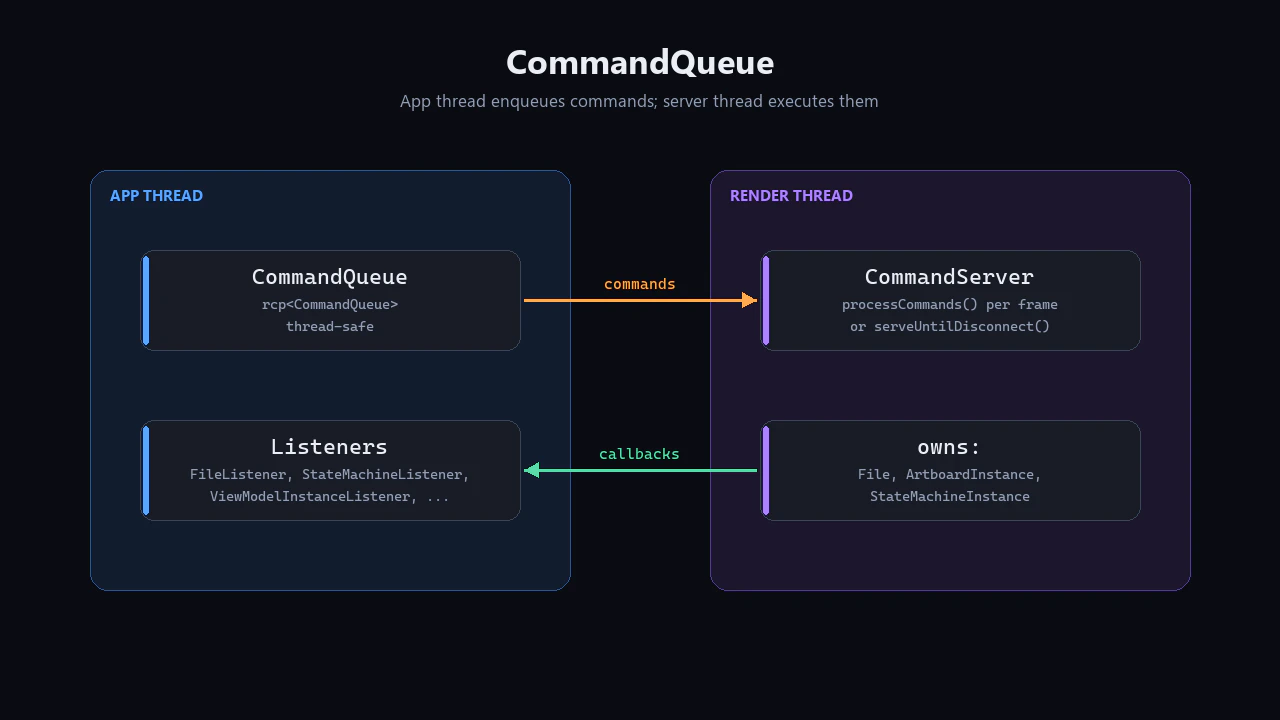 * `CommandQueue` is **reference-counted** (`rcp`) and
thread-safe. The app thread keeps one; the server holds the other end.
* `CommandServer` owns the real `File`, `ArtboardInstance`, and
`StateMachineInstance` objects. They never escape the render thread.
* All cross-thread identifiers are typed **handles**:
`FileHandle`, `ArtboardHandle`, `StateMachineHandle`,
`ViewModelInstanceHandle`, `RenderImageHandle`, `FontHandle`,
`AudioSourceHandle`. The app thread holds handles; the server resolves
them to real objects.
* Async results (file loaded, state machine settled, image decoded) come
back via **listener callbacks** registered against handles.
## Setting Up the Queue and Server
```cpp theme={null}
#include "rive/command_queue.hpp"
#include "rive/command_server.hpp"
// Shared between threads.
rcp queue = make_rcp();
```
On the render thread, create a `CommandServer` and pump it:
```cpp theme={null}
// `factory` is your Factory* — usually your RenderContext.
CommandServer server(queue, factory);
// Drain pending commands once per frame...
server.processCommands();
// ...or block on a dedicated thread until disconnect.
// server.serveUntilDisconnect();
```
`processCommands()` is non-blocking — call it before each frame.
`serveUntilDisconnect()` is the run-loop variant for a worker thread:
blocks waiting for commands, and returns when the app thread calls
`queue->disconnect()`.
## Loading a File and Creating a State Machine
All these calls happen on the app thread. They enqueue commands and
return handles **immediately** — the actual work happens on the server
thread.
```cpp theme={null}
std::vector rivBytes = readFile("hero.riv");
FileHandle file = queue->loadFile(std::move(rivBytes));
ArtboardHandle artboard = queue->instantiateDefaultArtboard(file);
StateMachineHandle sm = queue->instantiateDefaultStateMachine(artboard);
```
The handles are valid to use immediately even though the load hasn't
happened yet — subsequent commands queued against them will execute in
order on the server.
## Advancing and Drawing
```cpp theme={null}
// App thread:
queue->advanceStateMachine(sm, /* dt = */ 1.f / 60.f);
```
Drawing is handled differently — you register a draw callback that runs
on the server thread when the queue tells it to. Pattern: create a
**draw key**, attach a callback, then tell the server to run that key.
See the `CommandQueue::drawCallback` and `runDraw` methods in
[`command_queue.hpp`](https://github.com/rive-app/rive-runtime/blob/main/include/rive/command_queue.hpp)
for the full draw-callback API; the canonical example is the
command-queue D3D11 sample in the rive monorepo
(`packages/sample_win32_d3d11_cq/`).
## Async Results: Listeners
Because commands run asynchronously, results come back via listener
callbacks. Each handle type has a matching listener with `on…` methods:
```cpp theme={null}
class MyFileListener : public CommandQueue::FileListener
{
public:
void onFileLoaded(const FileHandle, uint64_t requestId) override
{
// Safe to instantiate artboards now, etc.
}
};
MyFileListener listener;
listener.attach(queue, file); // register against this handle
```
Listeners available include:
* `FileListener` — `onFileLoaded`, `onFileDeleted`, `onArtboardsListed`,
`onViewModelsListed`, …
* `ArtboardListener` — `onArtboardInstanced`, `onArtboardError`,
`onArtboardDeleted`.
* `StateMachineListener` — `onStateMachineInstanced`,
`onStateMachineSettled` (called on the request that caused the state
machine to settle), …
* `ViewModelInstanceListener`, `RenderImageListener`, `FontListener`,
`AudioSourceListener` — for the other resource types.
`requestId` lets you correlate callbacks with specific commands.
Pass a non-zero `requestId` to the queue methods that accept one (e.g.
`deleteFile(handle, requestId)`) and your listener will receive the same
ID back.
## Pointer Events
Pointer events go through the queue too. `CommandQueue::PointerEvent`
carries the screen-space position; the server converts it to artboard
space using the state machine's most recent transform:
```cpp theme={null}
CommandQueue::PointerEvent ev;
ev.position = { mouseX, mouseY };
ev.kind = CommandQueue::PointerEvent::Kind::move;
queue->queuePointerEvent(sm, ev);
```
## Teardown
The app thread tells the server to stop:
```cpp theme={null}
queue->disconnect();
```
If the server is running `serveUntilDisconnect()`, that call returns
when the disconnect command arrives. After that, joining the server
thread is your responsibility.
Resource handles are cleaned up by enqueuing explicit delete commands
(or letting the server destructor reap them):
```cpp theme={null}
queue->deleteStateMachine(sm);
queue->deleteArtboard(artboard);
queue->deleteFile(file);
```
## When to Use the Direct API Instead
The direct `File` / `Artboard` / `StateMachineInstance` API documented in
the other pages on this site is simpler when:
* Your app already drives Rive from the render thread.
* You don't need handle-based identity across threads.
* You want synchronous return values rather than listener callbacks.
`CommandQueue` exists for the multithreaded case — it's the right tool
for engines, render servers, and apps with a dedicated GPU thread.
* `CommandQueue` is **reference-counted** (`rcp`) and
thread-safe. The app thread keeps one; the server holds the other end.
* `CommandServer` owns the real `File`, `ArtboardInstance`, and
`StateMachineInstance` objects. They never escape the render thread.
* All cross-thread identifiers are typed **handles**:
`FileHandle`, `ArtboardHandle`, `StateMachineHandle`,
`ViewModelInstanceHandle`, `RenderImageHandle`, `FontHandle`,
`AudioSourceHandle`. The app thread holds handles; the server resolves
them to real objects.
* Async results (file loaded, state machine settled, image decoded) come
back via **listener callbacks** registered against handles.
## Setting Up the Queue and Server
```cpp theme={null}
#include "rive/command_queue.hpp"
#include "rive/command_server.hpp"
// Shared between threads.
rcp queue = make_rcp();
```
On the render thread, create a `CommandServer` and pump it:
```cpp theme={null}
// `factory` is your Factory* — usually your RenderContext.
CommandServer server(queue, factory);
// Drain pending commands once per frame...
server.processCommands();
// ...or block on a dedicated thread until disconnect.
// server.serveUntilDisconnect();
```
`processCommands()` is non-blocking — call it before each frame.
`serveUntilDisconnect()` is the run-loop variant for a worker thread:
blocks waiting for commands, and returns when the app thread calls
`queue->disconnect()`.
## Loading a File and Creating a State Machine
All these calls happen on the app thread. They enqueue commands and
return handles **immediately** — the actual work happens on the server
thread.
```cpp theme={null}
std::vector rivBytes = readFile("hero.riv");
FileHandle file = queue->loadFile(std::move(rivBytes));
ArtboardHandle artboard = queue->instantiateDefaultArtboard(file);
StateMachineHandle sm = queue->instantiateDefaultStateMachine(artboard);
```
The handles are valid to use immediately even though the load hasn't
happened yet — subsequent commands queued against them will execute in
order on the server.
## Advancing and Drawing
```cpp theme={null}
// App thread:
queue->advanceStateMachine(sm, /* dt = */ 1.f / 60.f);
```
Drawing is handled differently — you register a draw callback that runs
on the server thread when the queue tells it to. Pattern: create a
**draw key**, attach a callback, then tell the server to run that key.
See the `CommandQueue::drawCallback` and `runDraw` methods in
[`command_queue.hpp`](https://github.com/rive-app/rive-runtime/blob/main/include/rive/command_queue.hpp)
for the full draw-callback API; the canonical example is the
command-queue D3D11 sample in the rive monorepo
(`packages/sample_win32_d3d11_cq/`).
## Async Results: Listeners
Because commands run asynchronously, results come back via listener
callbacks. Each handle type has a matching listener with `on…` methods:
```cpp theme={null}
class MyFileListener : public CommandQueue::FileListener
{
public:
void onFileLoaded(const FileHandle, uint64_t requestId) override
{
// Safe to instantiate artboards now, etc.
}
};
MyFileListener listener;
listener.attach(queue, file); // register against this handle
```
Listeners available include:
* `FileListener` — `onFileLoaded`, `onFileDeleted`, `onArtboardsListed`,
`onViewModelsListed`, …
* `ArtboardListener` — `onArtboardInstanced`, `onArtboardError`,
`onArtboardDeleted`.
* `StateMachineListener` — `onStateMachineInstanced`,
`onStateMachineSettled` (called on the request that caused the state
machine to settle), …
* `ViewModelInstanceListener`, `RenderImageListener`, `FontListener`,
`AudioSourceListener` — for the other resource types.
`requestId` lets you correlate callbacks with specific commands.
Pass a non-zero `requestId` to the queue methods that accept one (e.g.
`deleteFile(handle, requestId)`) and your listener will receive the same
ID back.
## Pointer Events
Pointer events go through the queue too. `CommandQueue::PointerEvent`
carries the screen-space position; the server converts it to artboard
space using the state machine's most recent transform:
```cpp theme={null}
CommandQueue::PointerEvent ev;
ev.position = { mouseX, mouseY };
ev.kind = CommandQueue::PointerEvent::Kind::move;
queue->queuePointerEvent(sm, ev);
```
## Teardown
The app thread tells the server to stop:
```cpp theme={null}
queue->disconnect();
```
If the server is running `serveUntilDisconnect()`, that call returns
when the disconnect command arrives. After that, joining the server
thread is your responsibility.
Resource handles are cleaned up by enqueuing explicit delete commands
(or letting the server destructor reap them):
```cpp theme={null}
queue->deleteStateMachine(sm);
queue->deleteArtboard(artboard);
queue->deleteFile(file);
```
## When to Use the Direct API Instead
The direct `File` / `Artboard` / `StateMachineInstance` API documented in
the other pages on this site is simpler when:
* Your app already drives Rive from the render thread.
* You don't need handle-based identity across threads.
* You want synchronous return values rather than listener callbacks.
`CommandQueue` exists for the multithreaded case — it's the right tool
for engines, render servers, and apps with a dedicated GPU thread.