> ## Documentation Index
> Fetch the complete documentation index at: https://rive.app/docs/llms.txt
> Use this file to discover all available pages before exploring further.
# Renderers
> Set up the GPU backend for your platform.
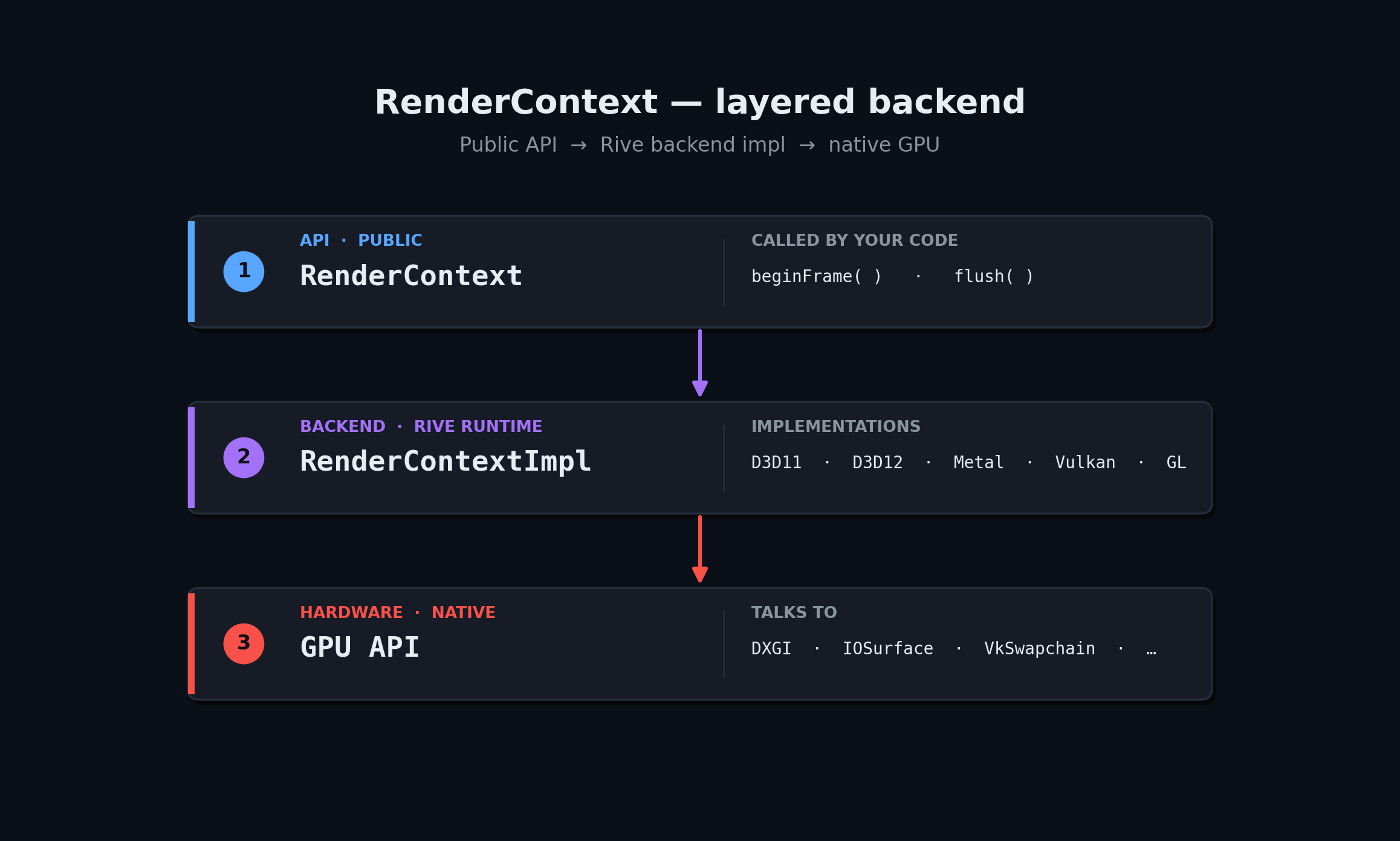
`rive::gpu::RenderContext` is the API-agnostic frontend to Rive's GPU
renderer. You create one of the per-backend `*Impl::MakeContext` factories,
hand it to your render loop, and the rest of the C++ API stays identical.
 `RenderContext` also implements `rive::Factory`, so the same object you pass to
`File::import` is the one that owns your GPU resources.
Header: `rive/renderer/d3d11/render_context_d3d_impl.hpp`
```cpp theme={null}
#include "rive/renderer/d3d11/render_context_d3d_impl.hpp"
using namespace rive::gpu;
ComPtr device;
ComPtr context;
// ... create device + context with D3D_FEATURE_LEVEL_11_1 ...
D3DContextOptions options;
options.isIntel = adapterDesc.VendorId == 0x163C ||
adapterDesc.VendorId == 0x8086 ||
adapterDesc.VendorId == 0x8087;
std::unique_ptr rc =
RenderContextD3DImpl::MakeContext(device, context, options);
auto* impl = rc->static_impl_cast();
rcp target = impl->makeRenderTarget(width, height);
// Each frame: bind the current backbuffer to the render target.
target->setTargetTexture(backbufferTexture);
```
Swap-chain notes:
* Set `BufferUsage = DXGI_USAGE_RENDER_TARGET_OUTPUT | DXGI_USAGE_UNORDERED_ACCESS`.
* Use `DXGI_FORMAT_R8G8B8A8_UNORM` (or the `_SRGB` variant); other formats
may force the renderer onto an offscreen path.
* Set `options.isIntel = true` on Intel HD Graphics — works around a driver
bug in pixel-local-storage emulation.
For a working reference, see Rive's
[`tests/player`](https://github.com/rive-app/rive-runtime/tree/main/tests/player)
sample app and the D3D-specific wiring in
[`tests/common/offscreen_rendertarget_d3d.cpp`](https://github.com/rive-app/rive-runtime/blob/main/tests/common/offscreen_rendertarget_d3d.cpp).
Header: `rive/renderer/d3d12/render_context_d3d12_impl.hpp`
```cpp theme={null}
#include "rive/renderer/d3d12/render_context_d3d12_impl.hpp"
using namespace rive::gpu;
ComPtr device;
ComPtr initList; // recording state
D3DContextOptions options;
std::unique_ptr rc =
RenderContextD3D12Impl::MakeContext(device, initList.Get(), options);
auto* impl = rc->static_impl_cast();
rcp target = impl->makeRenderTarget(width, height);
```
Each frame, populate `RenderContext::FlushResources::externalCommandBuffer`
with the `ID3D12GraphicsCommandList` that should record Rive's draws, and
bump `currentFrameNumber` / `safeFrameNumber` so the renderer can recycle
buffers safely against your fence values.
The init command list passed to `MakeContext` must be in the **recording**
state. The renderer uses it to upload static buffers. Submit it (and wait
for the GPU to finish) before issuing any frames.
Header: `rive/renderer/metal/render_context_metal_impl.h`
```objc theme={null}
#import "rive/renderer/metal/render_context_metal_impl.h"
using namespace rive::gpu;
id device = MTLCreateSystemDefaultDevice();
RenderContextMetalImpl::ContextOptions opts;
std::unique_ptr rc =
RenderContextMetalImpl::MakeContext(device, opts);
```
Pass an `id` per frame via
`FlushResources::externalCommandBuffer`. Rive does **not** present — you
own the `CAMetalLayer` and the `present` call.
Header: `rive/renderer/vulkan/render_context_vulkan_impl.hpp`
```cpp theme={null}
#include "rive/renderer/vulkan/render_context_vulkan_impl.hpp"
using namespace rive::gpu;
VulkanFeatures features;
features.independentBlend = true; // detected from device features
// ... fill out from VkPhysicalDeviceFeatures ...
std::unique_ptr rc =
RenderContextVulkanImpl::MakeContext(
instance,
physicalDevice,
device,
features,
vkGetInstanceProcAddr);
```
Each frame:
* Set `FlushResources::externalCommandBuffer` to a recording
`VkCommandBuffer`.
* Set `FlushResources::currentFrameNumber` to the frame index you'll signal,
and `safeFrameNumber` to the most recent frame whose fence you've waited on.
Vulkan is the only backend that supports `FrameDescriptor::virtualTileWidth`
/ `virtualTileHeight` (frame splitting), useful for letting other
workloads pre-empt Rive on tiled GPUs.
Header: `rive/renderer/gl/render_context_gl_impl.hpp`
```cpp theme={null}
#include "rive/renderer/gl/render_context_gl_impl.hpp"
#include "rive/renderer/gl/render_target_gl.hpp"
using namespace rive::gpu;
RenderContextGLImpl::ContextOptions opts;
// opts.disableFragmentShaderInterlock = true; // if your driver lies
std::unique_ptr rc = RenderContextGLImpl::MakeContext(opts);
```
Construct a render target that wraps either an external texture or an
existing FBO — the doc graph stays the same, only the binding differs:
```cpp theme={null}
// Render into a texture you own.
rcp target =
make_rcp(width, height);
target->setTargetTexture(externalTextureID); // GLuint, you keep ownership
// Or, render into an existing FBO you own.
rcp target =
make_rcp(
width, height, fboId, sampleCount);
```
Prefer `TextureRenderTargetGL` when you can — `FramebufferRenderTargetGL`
often has to render to an offscreen texture and blit back, because the
external FBO is usually not readable.
Capability tiers Rive will auto-select between:
* **Pixel Local Storage** (best — Apple GPUs, modern mobile).
* **Fragment Shader Interlock** (NVIDIA, Intel via `GL_INTEL_…`).
* **R/W Texture / EXT\_shader\_pixel\_local\_storage** fallbacks.
* **MSAA** path on truly minimal drivers.
For WebGL 2: the same header builds against Emscripten — `MakeContext`
will pick the WebGL-compatible PLS implementation automatically.
## Picking Modes per Frame
`RenderContext::FrameDescriptor` carries flags that change the rendering
algorithm:
| Field | Effect |
| ----------------------- | ------------------------------------------------------------------- |
| `loadAction` | `clear` (default) / `preserveRenderTarget` / `dontCare`. |
| `clearColor` | ARGB; only used when `loadAction == clear`. |
| `msaaSampleCount` | Nonzero forces MSAA mode and disables PLS. |
| `disableRasterOrdering` | Forces the atomic path even where rasterizer ordering is supported. |
| `ditherMode` | `none` or `interleavedGradientNoise` (default). |
Most apps leave these at defaults. Override only when you see a specific issue
on a specific GPU.
## Choosing a Backend
| Platform | Recommendation |
| --------------- | -------------------------------------------------------------------------- |
| Windows desktop | **D3D11** if you only need 11-class hardware, **D3D12** for newer engines. |
| macOS / iOS | **Metal**. |
| Android | **Vulkan** on supported devices, **GLES** as fallback. |
| Linux desktop | **Vulkan**. |
| Web | **WebGL 2** via `RenderContextGLImpl` (build with Emscripten). |
| Game console | Talk to Rive — separate runtimes ship for PS5, Xbox, and Switch. |
`RenderContext` also implements `rive::Factory`, so the same object you pass to
`File::import` is the one that owns your GPU resources.
Header: `rive/renderer/d3d11/render_context_d3d_impl.hpp`
```cpp theme={null}
#include "rive/renderer/d3d11/render_context_d3d_impl.hpp"
using namespace rive::gpu;
ComPtr device;
ComPtr context;
// ... create device + context with D3D_FEATURE_LEVEL_11_1 ...
D3DContextOptions options;
options.isIntel = adapterDesc.VendorId == 0x163C ||
adapterDesc.VendorId == 0x8086 ||
adapterDesc.VendorId == 0x8087;
std::unique_ptr rc =
RenderContextD3DImpl::MakeContext(device, context, options);
auto* impl = rc->static_impl_cast();
rcp target = impl->makeRenderTarget(width, height);
// Each frame: bind the current backbuffer to the render target.
target->setTargetTexture(backbufferTexture);
```
Swap-chain notes:
* Set `BufferUsage = DXGI_USAGE_RENDER_TARGET_OUTPUT | DXGI_USAGE_UNORDERED_ACCESS`.
* Use `DXGI_FORMAT_R8G8B8A8_UNORM` (or the `_SRGB` variant); other formats
may force the renderer onto an offscreen path.
* Set `options.isIntel = true` on Intel HD Graphics — works around a driver
bug in pixel-local-storage emulation.
For a working reference, see Rive's
[`tests/player`](https://github.com/rive-app/rive-runtime/tree/main/tests/player)
sample app and the D3D-specific wiring in
[`tests/common/offscreen_rendertarget_d3d.cpp`](https://github.com/rive-app/rive-runtime/blob/main/tests/common/offscreen_rendertarget_d3d.cpp).
Header: `rive/renderer/d3d12/render_context_d3d12_impl.hpp`
```cpp theme={null}
#include "rive/renderer/d3d12/render_context_d3d12_impl.hpp"
using namespace rive::gpu;
ComPtr device;
ComPtr initList; // recording state
D3DContextOptions options;
std::unique_ptr rc =
RenderContextD3D12Impl::MakeContext(device, initList.Get(), options);
auto* impl = rc->static_impl_cast();
rcp target = impl->makeRenderTarget(width, height);
```
Each frame, populate `RenderContext::FlushResources::externalCommandBuffer`
with the `ID3D12GraphicsCommandList` that should record Rive's draws, and
bump `currentFrameNumber` / `safeFrameNumber` so the renderer can recycle
buffers safely against your fence values.
The init command list passed to `MakeContext` must be in the **recording**
state. The renderer uses it to upload static buffers. Submit it (and wait
for the GPU to finish) before issuing any frames.
Header: `rive/renderer/metal/render_context_metal_impl.h`
```objc theme={null}
#import "rive/renderer/metal/render_context_metal_impl.h"
using namespace rive::gpu;
id device = MTLCreateSystemDefaultDevice();
RenderContextMetalImpl::ContextOptions opts;
std::unique_ptr rc =
RenderContextMetalImpl::MakeContext(device, opts);
```
Pass an `id` per frame via
`FlushResources::externalCommandBuffer`. Rive does **not** present — you
own the `CAMetalLayer` and the `present` call.
Header: `rive/renderer/vulkan/render_context_vulkan_impl.hpp`
```cpp theme={null}
#include "rive/renderer/vulkan/render_context_vulkan_impl.hpp"
using namespace rive::gpu;
VulkanFeatures features;
features.independentBlend = true; // detected from device features
// ... fill out from VkPhysicalDeviceFeatures ...
std::unique_ptr rc =
RenderContextVulkanImpl::MakeContext(
instance,
physicalDevice,
device,
features,
vkGetInstanceProcAddr);
```
Each frame:
* Set `FlushResources::externalCommandBuffer` to a recording
`VkCommandBuffer`.
* Set `FlushResources::currentFrameNumber` to the frame index you'll signal,
and `safeFrameNumber` to the most recent frame whose fence you've waited on.
Vulkan is the only backend that supports `FrameDescriptor::virtualTileWidth`
/ `virtualTileHeight` (frame splitting), useful for letting other
workloads pre-empt Rive on tiled GPUs.
Header: `rive/renderer/gl/render_context_gl_impl.hpp`
```cpp theme={null}
#include "rive/renderer/gl/render_context_gl_impl.hpp"
#include "rive/renderer/gl/render_target_gl.hpp"
using namespace rive::gpu;
RenderContextGLImpl::ContextOptions opts;
// opts.disableFragmentShaderInterlock = true; // if your driver lies
std::unique_ptr rc = RenderContextGLImpl::MakeContext(opts);
```
Construct a render target that wraps either an external texture or an
existing FBO — the doc graph stays the same, only the binding differs:
```cpp theme={null}
// Render into a texture you own.
rcp target =
make_rcp(width, height);
target->setTargetTexture(externalTextureID); // GLuint, you keep ownership
// Or, render into an existing FBO you own.
rcp target =
make_rcp(
width, height, fboId, sampleCount);
```
Prefer `TextureRenderTargetGL` when you can — `FramebufferRenderTargetGL`
often has to render to an offscreen texture and blit back, because the
external FBO is usually not readable.
Capability tiers Rive will auto-select between:
* **Pixel Local Storage** (best — Apple GPUs, modern mobile).
* **Fragment Shader Interlock** (NVIDIA, Intel via `GL_INTEL_…`).
* **R/W Texture / EXT\_shader\_pixel\_local\_storage** fallbacks.
* **MSAA** path on truly minimal drivers.
For WebGL 2: the same header builds against Emscripten — `MakeContext`
will pick the WebGL-compatible PLS implementation automatically.
## Picking Modes per Frame
`RenderContext::FrameDescriptor` carries flags that change the rendering
algorithm:
| Field | Effect |
| ----------------------- | ------------------------------------------------------------------- |
| `loadAction` | `clear` (default) / `preserveRenderTarget` / `dontCare`. |
| `clearColor` | ARGB; only used when `loadAction == clear`. |
| `msaaSampleCount` | Nonzero forces MSAA mode and disables PLS. |
| `disableRasterOrdering` | Forces the atomic path even where rasterizer ordering is supported. |
| `ditherMode` | `none` or `interleavedGradientNoise` (default). |
Most apps leave these at defaults. Override only when you see a specific issue
on a specific GPU.
## Choosing a Backend
| Platform | Recommendation |
| --------------- | -------------------------------------------------------------------------- |
| Windows desktop | **D3D11** if you only need 11-class hardware, **D3D12** for newer engines. |
| macOS / iOS | **Metal**. |
| Android | **Vulkan** on supported devices, **GLES** as fallback. |
| Linux desktop | **Vulkan**. |
| Web | **WebGL 2** via `RenderContextGLImpl` (build with Emscripten). |
| Game console | Talk to Rive — separate runtimes ship for PS5, Xbox, and Switch. |